Complete examples
These three projects include implementation notes, screenshots, downloads, and recorded results. Source archives are for further development; dist archives are for running or publishing. Create your own game when using an example: the source does not include the author’s credentials or Post binding.
| Example | What it demonstrates |
|---|---|
| H5 · Star Sprint | Plain HTML/JS and Vite versions of the same game |
| Unity · BoatAttack | Native WebGL export with original code and assets |
| Roblox · Ball Game | Browser reimplementation of characters, scene, and rules |
Example paths, patches, coordinates, and editor versions apply to these projects only. The recorded checks are dated 2026-10-08; mobile viewport checks do not establish real-phone compatibility.
H5 · Star Sprint
Collect 5 stars in 45 seconds while avoiding 2 patrol robots, starting with 3 health. Move with WASD/arrows, pause with P, and replay with R. Mobile viewports show directional buttons. The source includes plain HTML/JS and Vite versions.
Download and run
Extract the source into a new native-h5 folder with package.json at its root. Enter that folder and choose one route:
python3 -m http.server 8000 --bind 127.0.0.1 --directory plain/distnpm ci
npm run devOpen http://127.0.0.1:8000/ for the plain version or http://127.0.0.1:5173/ for Vite. The recorded folder was Move to Combos/native-h5 on the desktop; use your own actual path.
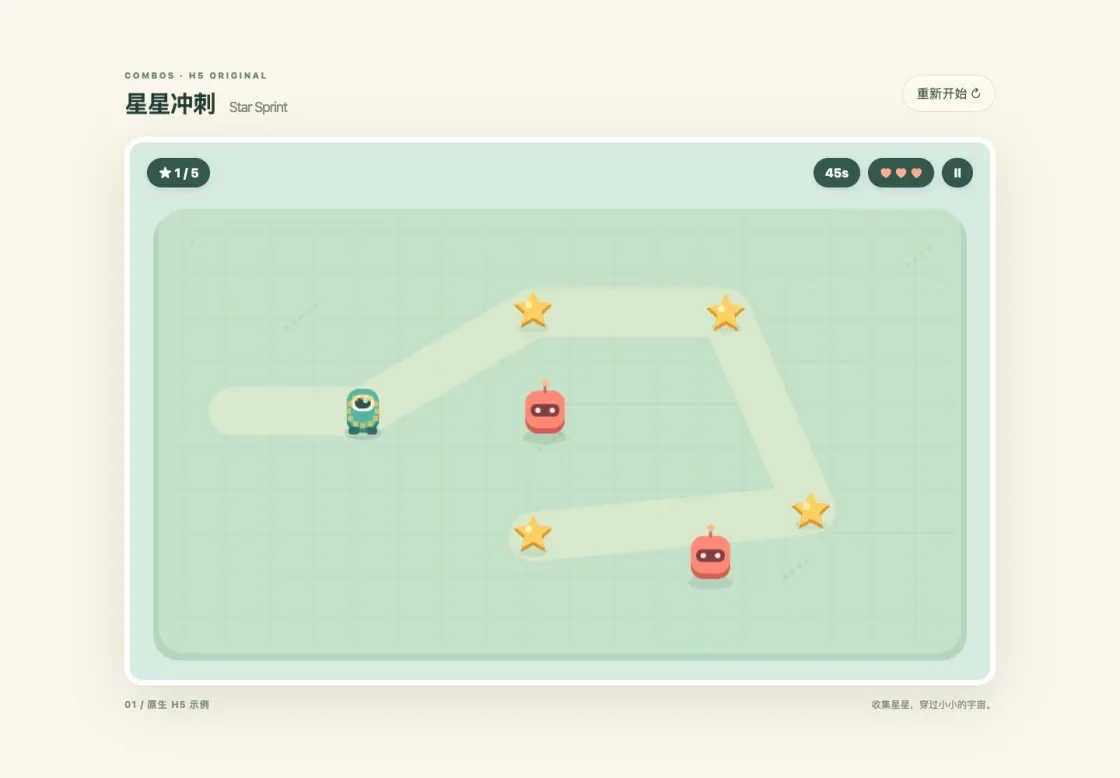
Star Sprint locally: verify starting, moving, collecting stars, and scoring.
Test, build, and publish
Start the game, collect a star, and check the score. Collect all 5 to win. Check collision damage, timeout failure, pause, and replay. For Vite, stop dev and run:
npm run build
npm run previewPreview at http://127.0.0.1:4173/; the plain route uses plain/dist directly. Follow Publish and update, retaining your own combos.json.
The recorded Vite release declared pc,mobile, revision 1. Play Star Sprint , Canvas code 07752. Full keyboard wins were recorded locally and online. Mobile controls were checked only in a browser viewport, not on a real phone.
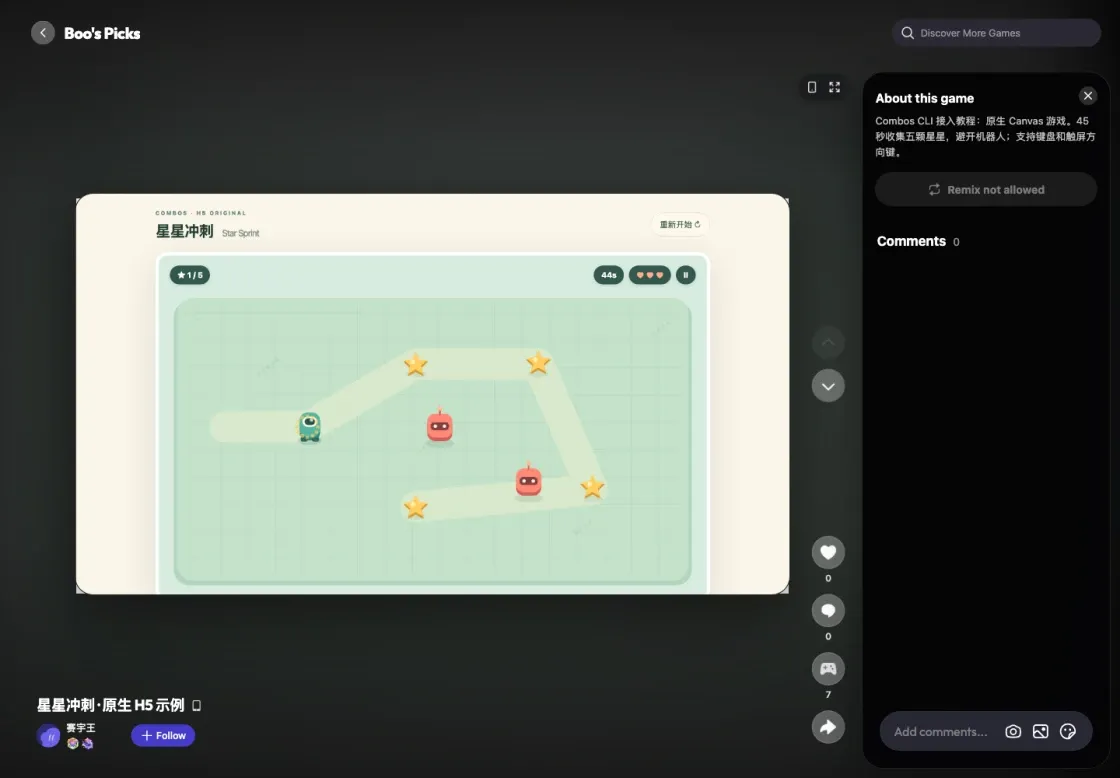
Star Sprint collecting its first star on the public Combos page.
Source and downloads
index.html/src/style.css provide Canvas, HUD, buttons, layout, and touch controls. src/main.js owns input, movement, collection, collisions, timing, outcomes, and drawing. package.json/vite.config.js define build scripts and relative URLs; plain/dist is the no-build equivalent.
This scoring snippet explains the example; it is not required Combos integration code:
if (!star.collected && Math.hypot(
star.x - state.player.x, star.y - state.player.y
) < 35) {
star.collected = true;
state.score++;
}
if (state.health <= 0 || state.elapsed >= 45) show('lost');
else if (state.score === 5) show('won');Both build archives extract with index.html at the root.
Unity · BoatAttack
This example uses official Unity BoatAttack at commit 91886a3ef1ac963aa10578fcaf1d59e9b6961ab3. The original baseline used 6000.2.0b8; this adaptation uses Unity 6.3 LTS 6000.3.25f1, Apple Silicon ARM64. It retains the boats, drivers, Island scene, water, physics, AI, and C# gameplay.
Obtain and adapt the example
Install Git LFS, clone into a fresh directory, fetch the large assets, and extract the adaptation archive into the project root before the two git apply commands. Apply the patch only once.
git clone https://github.com/Unity-Technologies/BoatAttack.git BoatAttack
cd BoatAttack
git checkout 91886a3ef1ac963aa10578fcaf1d59e9b6961ab3
git lfs pull
git lfs fsck
git apply --check tracked-project-changes.patch
git apply tracked-project-changes.patchDo not reapply it to an already adapted project. The archive contains compatibility/version changes, documentation, and licenses; it omits large original assets, Library, and dist, and installs no Combos plugin. For your own game, follow the general Unity guide.
Export and enter a race
Open main_menu.unity, test the menu and single-player settings in Play, then stop. Set scenes to main_menu.unity (0) and level_Island.unity (1), select Default, Gzip + fallback, and Addressables on Player Build. Build to dist.
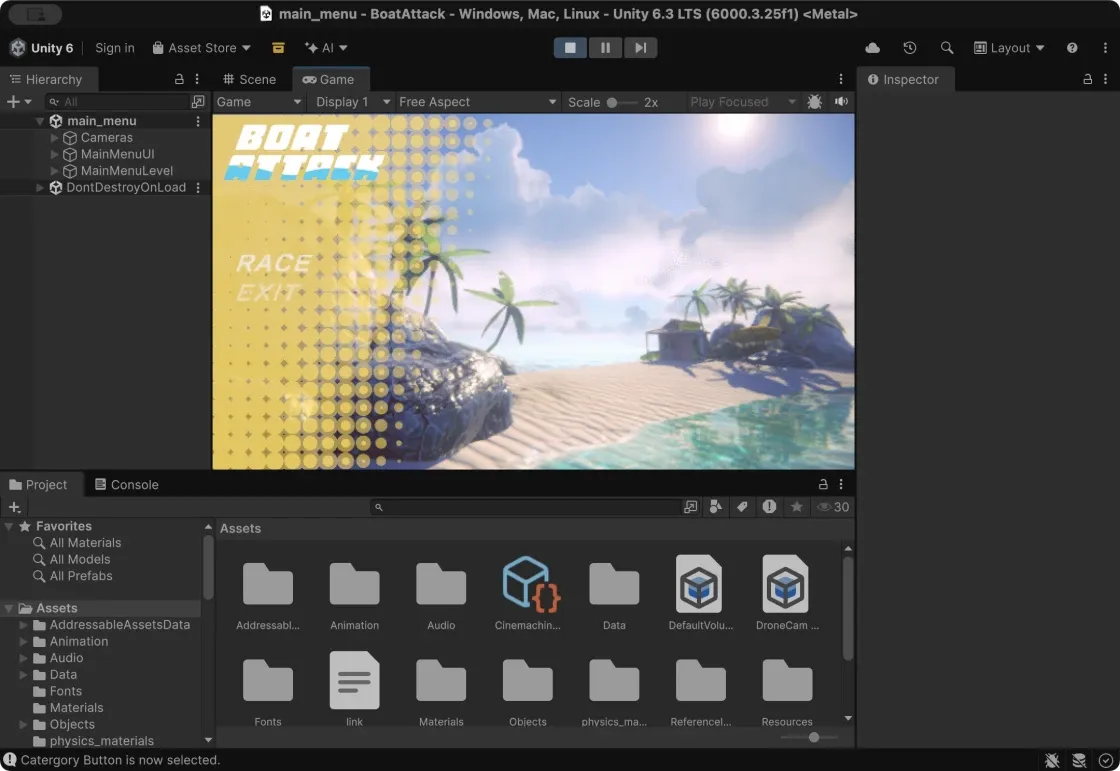
BoatAttack’s original main menu in the Unity editor.
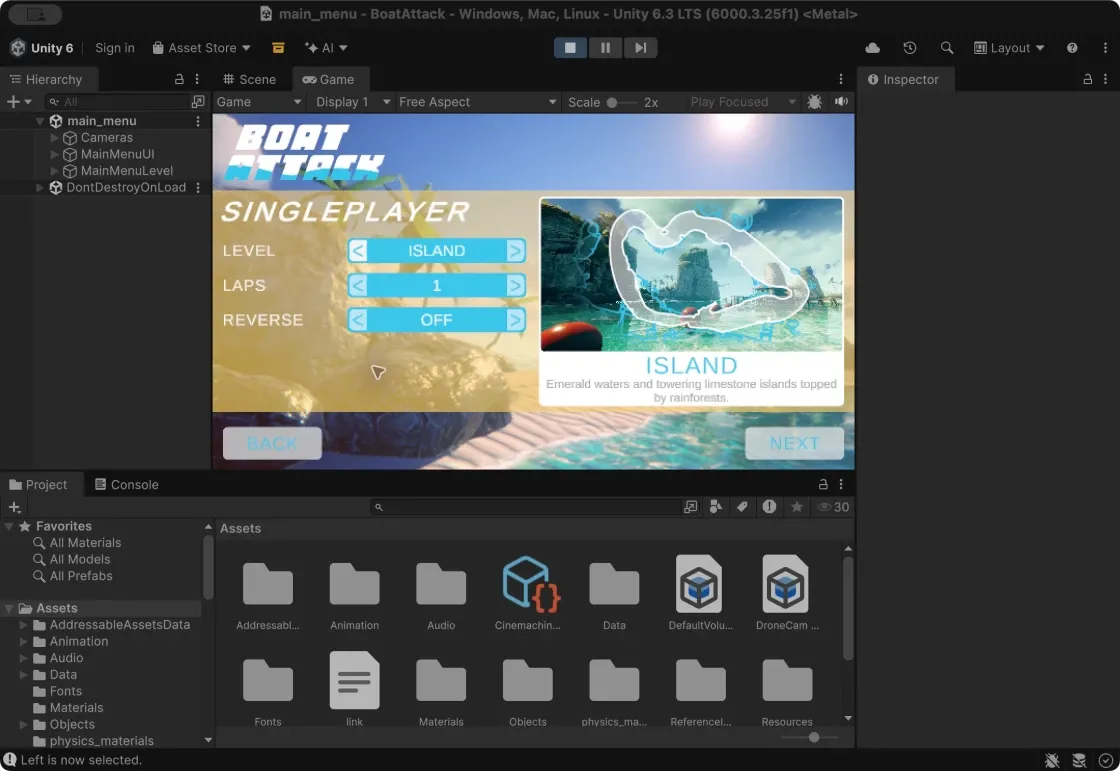
Single-player race setup: choose Island, then configure the boat.
The recorded native Build ran 18:21:57–18:26:03 (246 seconds): 27 files, 5 Addressables bundles, 127.36 MiB total, largest file 94.58 MiB, ZIP 124.88 MiB. The total and single-file limits were met; the ZIP root contained index.html.
python3 -m http.server 8001 --bind 127.0.0.1 --directory distOpen http://127.0.0.1:8001/. Choose RACE → SINGLEPLAYER → ISLAND (1 lap) → NEXT, configure the boat, then RACE. Wait for the intro/countdown and click the canvas for keyboard focus. W/↑/space accelerates, A/D steers, R resets, and F pauses/resumes.
Publish and verify
Capture a real race screenshot for cover.png. Create your own game with --platform pc --screen-orientation landscape; update only if the project already has your binding. Large uploads can use --timeout 10m.
The recorded native build updated the same Post to revision 2, published with submission_is_current=true. Play BoatAttack , Canvas code 08759. After stopping local servers, two independent browser sessions entered the race through the public page/share link, testing acceleration, steering, pause/resume, and R reset in one session; audio stayed muted. Core files and all 5 bundles loaded publicly without observed game runtime errors.
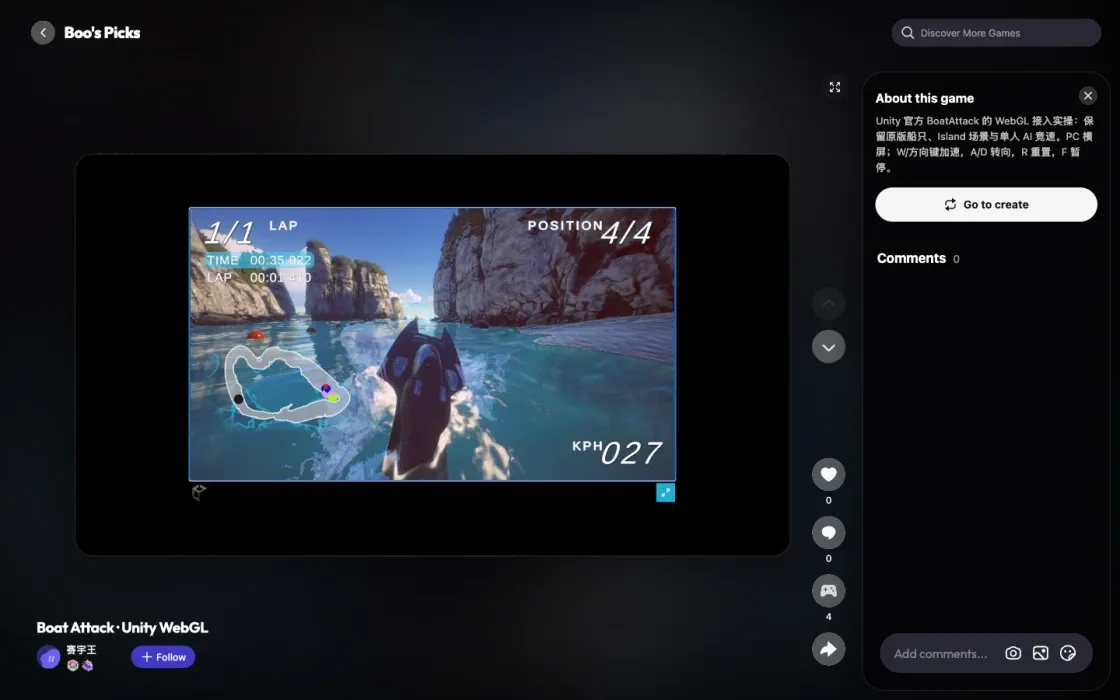
The native Default build racing on Combos.
Coverage: PC landscape single-player loading and driving. A full race win, mobile touch, and real-phone play were not verified. Loader/engine warnings remained; an outer-page unauthenticated profile 401 was recorded separately from game loading.
What changed
Original code/assets and the existing WebGL water branch remain. Unity generated the Default page without loader rewrites. Scene, compression, and Addressables settings were saved in native UI. The patch also adapts editor/Input System/URP versions and serialization. UIPanelFade.shader adds the _MainTex property required by newer uGUI:
[PerRendererData] _MainTex("Sprite Texture", 2D) = "white" {}Earlier custom Editor build scripts, Combos templates, and com.unity.pipeline were removed. The patch covers 31 tracked files relative to the fixed commit, including README-migration.md, WEBGL-MIGRATION.md, LOCAL_SETUP.md, and licenses. It is reproduction material for this project, not a universal Unity migration.
Download the BoatAttack adaptation.
Roblox · Ball Game
Based on Ball game open source , supplied as ball game.rbxl. Keep the original rules: wait 5 seconds, push a pink ball around three offset brick walls, touch WinPiece, turn the ball gold, and show Winner.
Inspect the original
Open and play the original in Roblox Studio, then stop and inspect scripts, avatar, scene, and properties without changing the .rbxl.
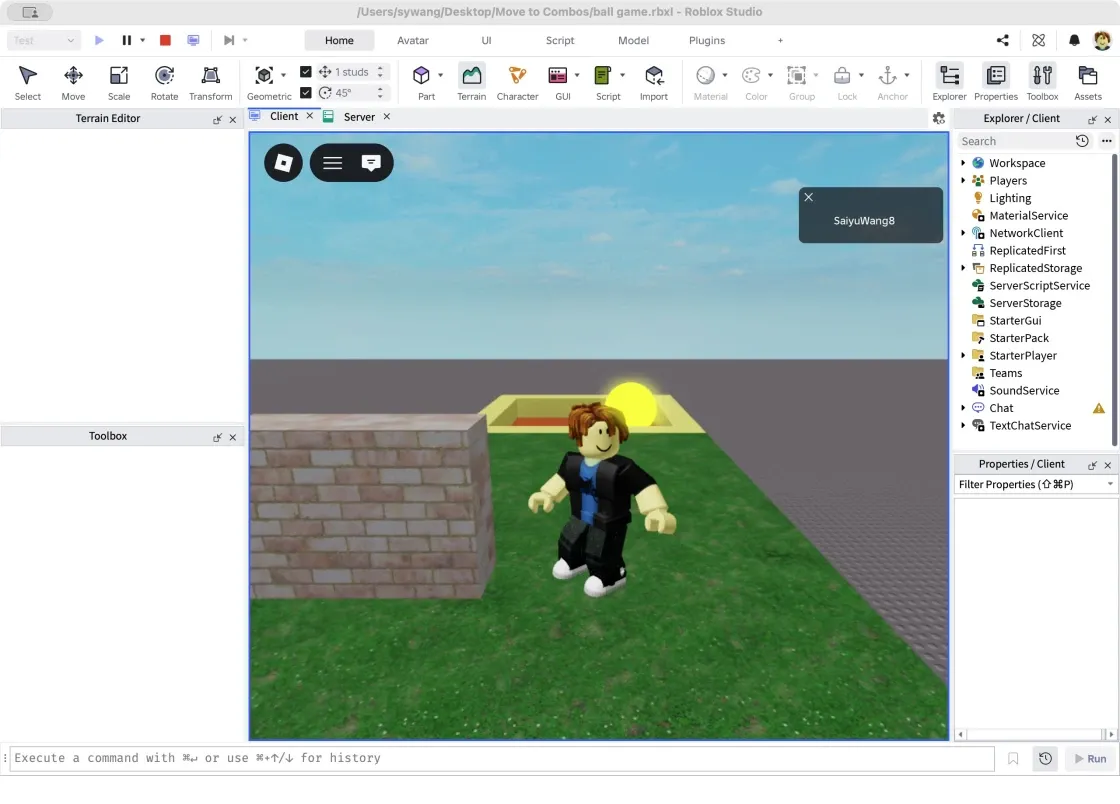
Original Roblox character, grass, walls, gray base, and finish.
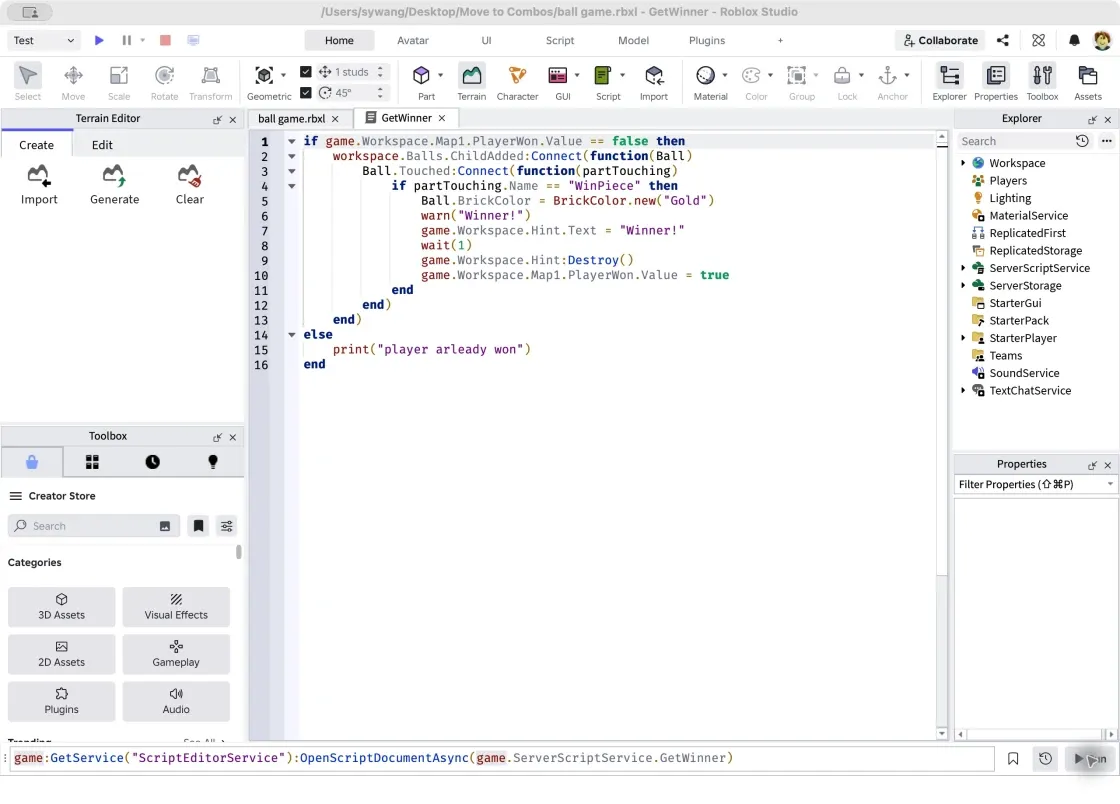
The original GetWinner script listens for ball contact with WinPiece.
Two scripts handle spawning and winning; Roblox supplies rendering, characters, input, camera, animation, physics, and the server runtime. The original ball is 5×5×5 studs, grass 18×1×74, and wall centers (22,17.5,34), (32,17.5,15), (21.5,17.5,-4). These values belong only to this example.
Ball.Touched:Connect(function(partTouching)
if partTouching.Name == "WinPiece" then
Ball.BrickColor = BrickColor.new("Gold")
warn("Winner!")
game.Workspace.Map1.PlayerWon.Value = true
end
end)For a simple Part scene, this read-only Studio Command Bar snippet prints properties to Output with Play stopped. Complex meshes, textures, and rigs need separate handling; it does not export a playable H5 game.
for _, part in ipairs(workspace:GetDescendants()) do
if part:IsA("BasePart") then
print(part:GetFullName(), part.Position, part.Size,
part.Material, part.Transparency)
end
endMap the source to H5
| Original | Browser implementation |
|---|---|
CreateBall: wait(5), Part, Neon | main.js: delay, visible mesh, and dynamic rigid body |
| GetWinner: Touched, PlayerWon | main.js: one win, gold ball, Winner UI |
| Map1, WinPiece, spawn | level.js + main.js: layout, geometry, colliders, including invisible barriers |
| Grass, brick, metal, dirt, sky | environment.js: browser materials and local textures |
| R15 Man, Pal Hair, shirt, jeans | avatar.js: 15 body segments, hair, smile, clothes, white-soled shoes |
| Humanoid and third-person camera | main.js, avatar.js, camera.js: movement, jump, animation, follow/orbit/zoom |
| Message / Hint | HTML/CSS HUD, start, pause, and win screens |
Roblox originally loads the account avatar at runtime. This version reconstructs its appearance with local geometry and textures, without importing official Roblox meshes. Simple Parts are rebuilt from their actual layout; other projects may reuse models/textures they are entitled to export.
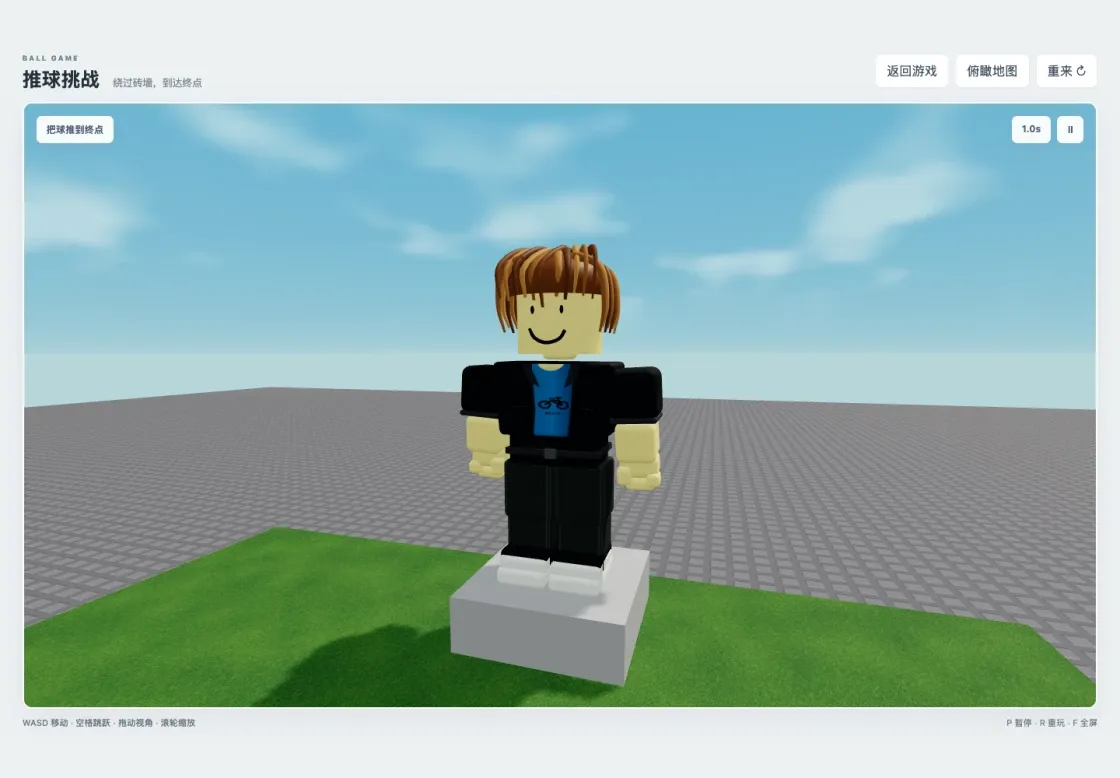
Reconstructed avatar from the front: hair, smile, blue-black top, dark trousers, and white soles.
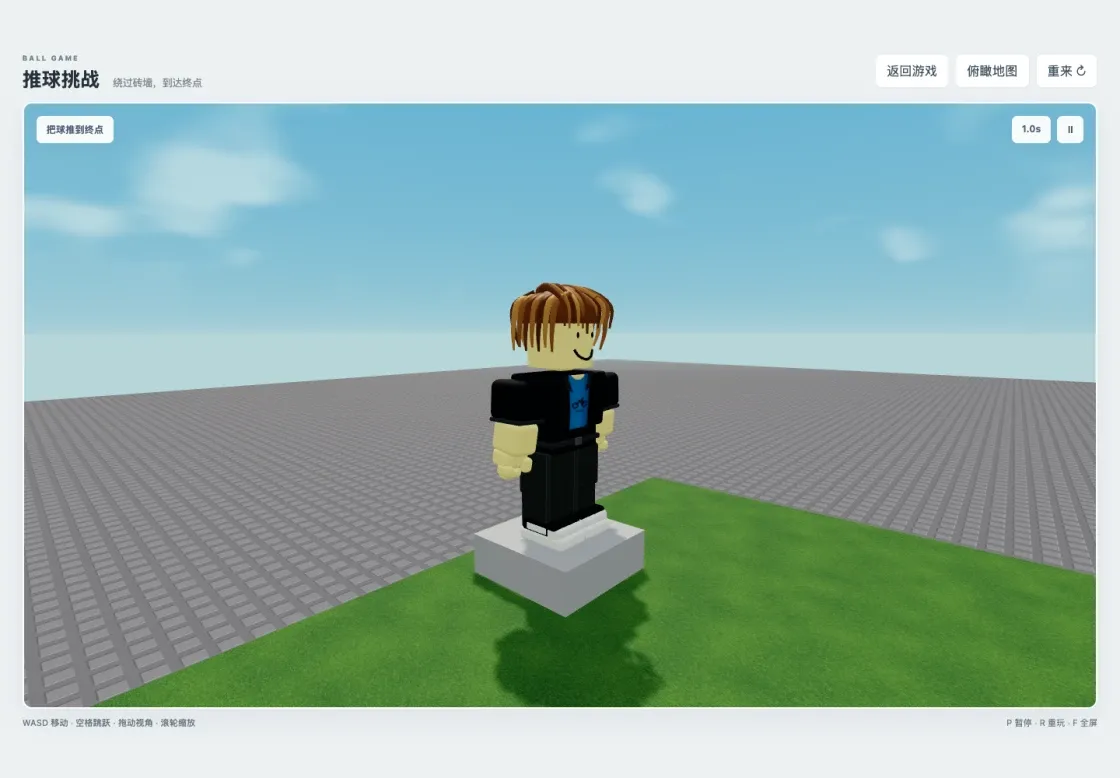
Side view showing hair, body segments, and shoes.
The example uses 1 stud = 0.3 m, origin (27,15,15), and ball radius 0.75 m. Coordinate conversion, mass, friction, rolling damping, and speed caps must be tuned for your own game.
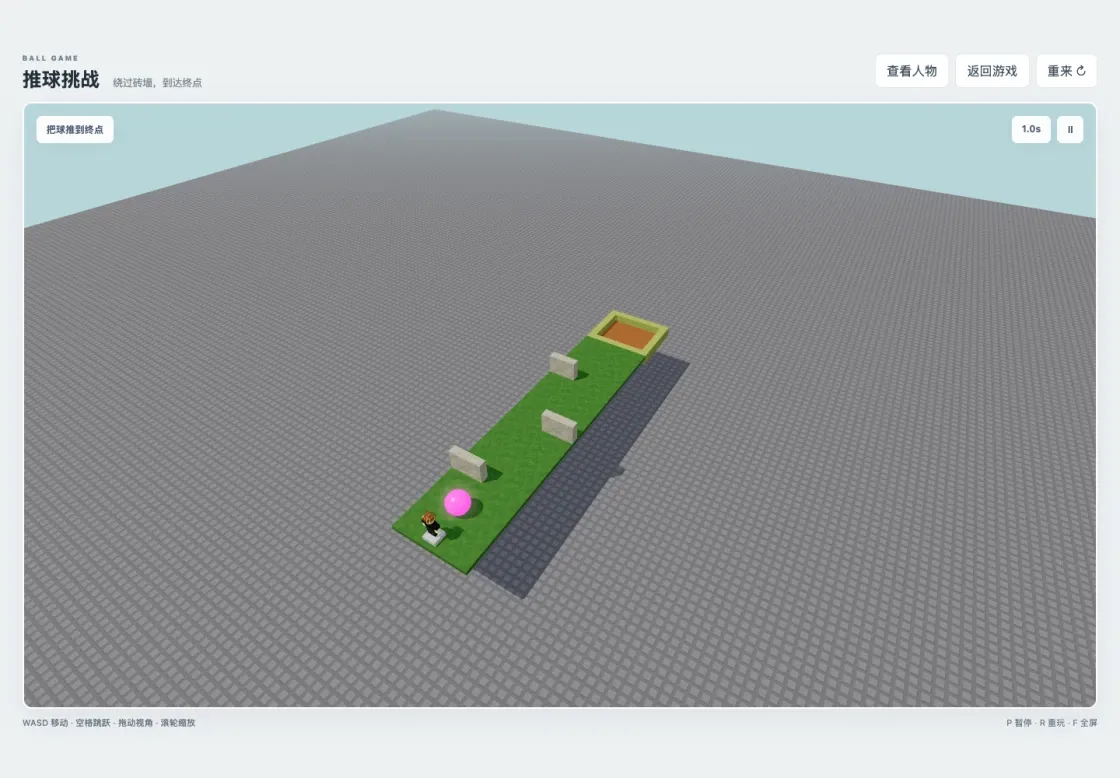
The reconstructed level preserves three obstacles, boundaries, and the finish.
ballBody.addEventListener('collide', event => {
if (event.body !== winPiece.body || state.mode !== 'playing' || state.won) return;
state.won = true;
state.phase = 'finished';
pink.color.set('#fff000');
pink.emissive.set('#fff000');
glow.material.color.set('#fff54b');
document.querySelector('#status').textContent = 'Winner!';
show('won');
});Added browser features include touch movement/jump, pause/resume, replay, fullscreen, avatar inspection, and a WebGL-unavailable message. Roblox accounts, Robux, multiplayer synchronization, and cloud saves were not migrated. This is not a complete Roblox runtime.
Run and verify
Extract source to a new ball-game-h5 folder with package.json at its root. It includes level.js, avatar.js, environment.js, camera.js, main.js, SOURCE-MAPPING.md, and original Lua copies under reference/.
npm ci
npm run dev
Open http://127.0.0.1:5174/. The recorded folder was Move to Combos/ball-game-h5 on the desktop; use your own path. Start and wait 5 seconds for the ball. WASD/arrows move, space jumps, dragging orbits, the wheel zooms, P pauses, R replays, and F toggles fullscreen. Avatar inspection freezes the round; returning resumes it.
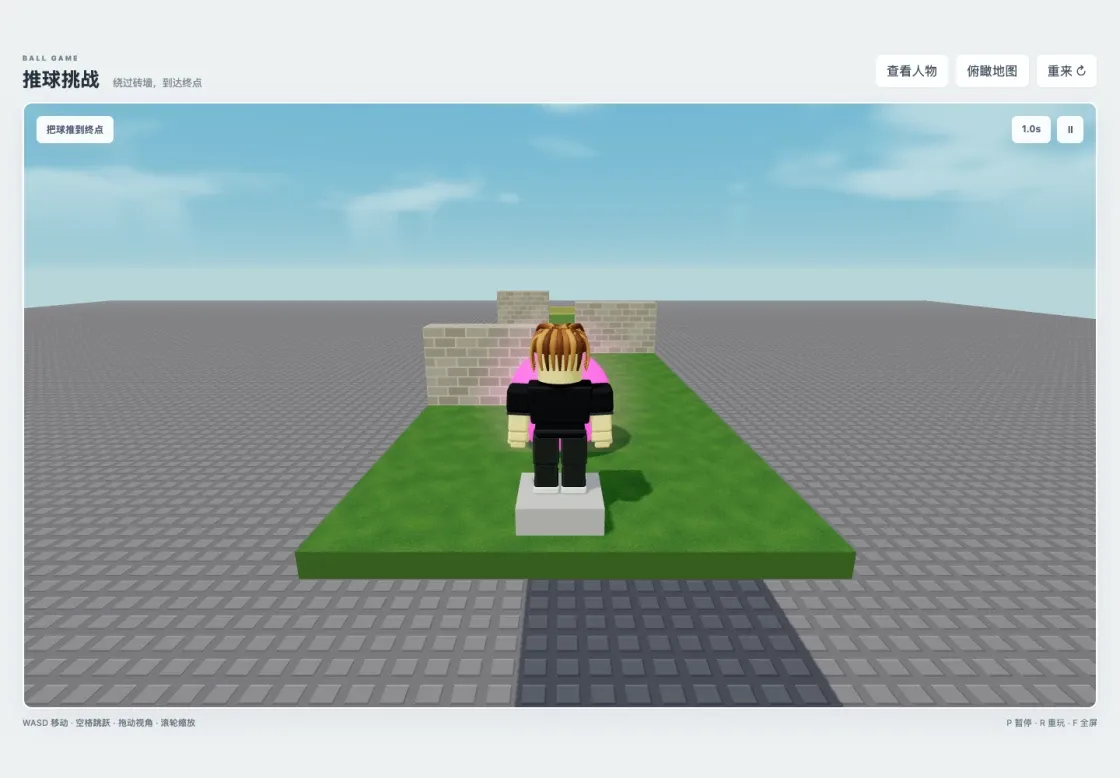
Local third-person play: physically push the pink ball.
From the default camera, pass the walls right, left, right, then enter the end recess. Actual ball contact with WinPiece turns it gold and displays Winner. The recorded local run completed a keyboard/physics win and checked landing after jumps, pause, replay, camera, and avatar inspection.
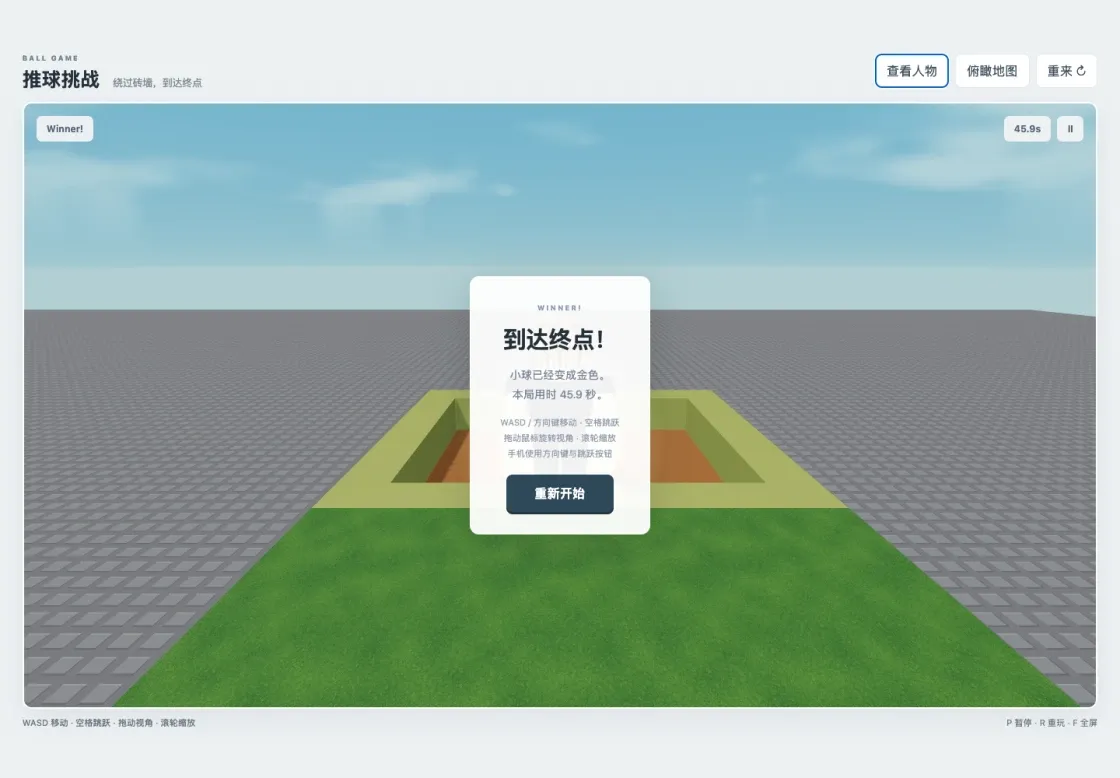
A completed local run: gold ball and Winner.
Build and publish
Stop dev and preview the finished output at http://127.0.0.1:4174/:
npm run build
npm run previewThe source includes cover.png. Create your own game, retain your binding for updates, and retest the public link with local servers stopped. The recorded character/scene update was revision 2, published with submission_is_current=true. Play Ball Game H5 , Canvas code 70261. An online keyboard win was completed; mobile buttons received viewport checks only, not real-phone acceptance.
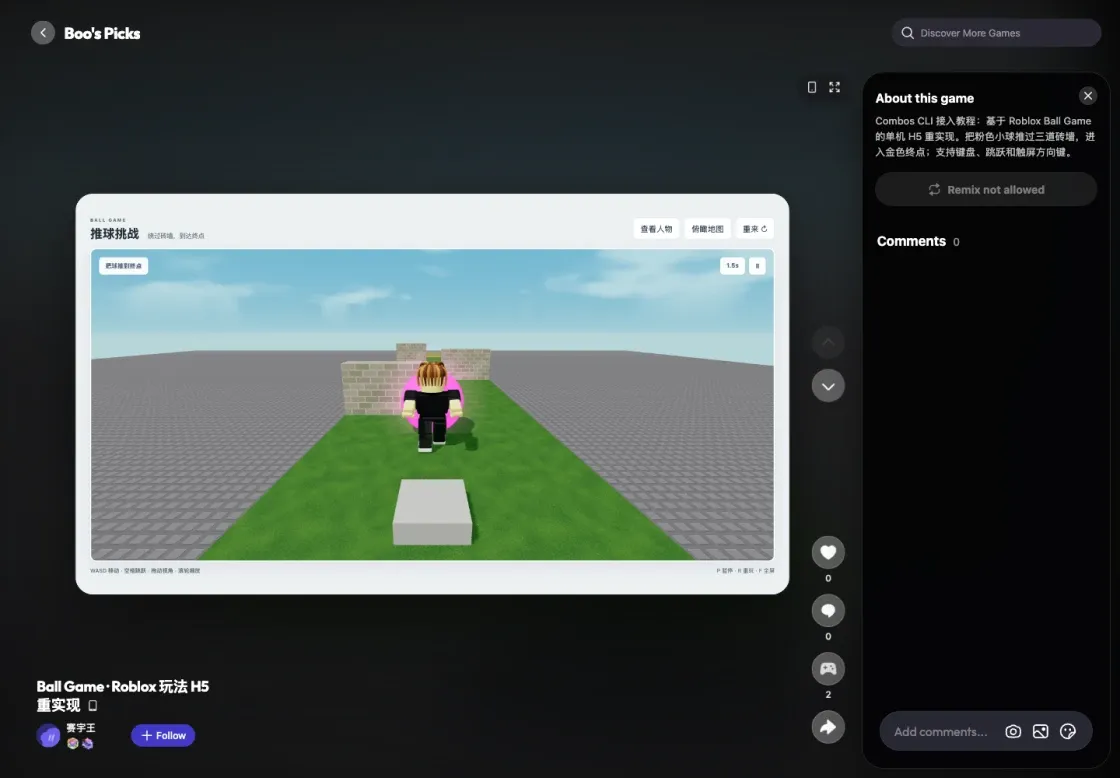
The updated Ball Game H5 on Combos with the local server stopped.
- Complete H5 source, Lua references, and source mapping
- Ready-to-run build, index.html at the extracted root
Source: Combos developer integration guide , checked on 2026-10-08 with CLI v1.14.2. Example results refer to the original recorded runs.